
Repetitive Strain Injuries are Hurting Our Employees, and Our Businesses
Repetitive strain injuries are a real risk to employees and businesses. According to the Bureau of Labor Statistics, U.S. Department of Labor, these injuries can cost businesses an estimated $45-54 billion a year.
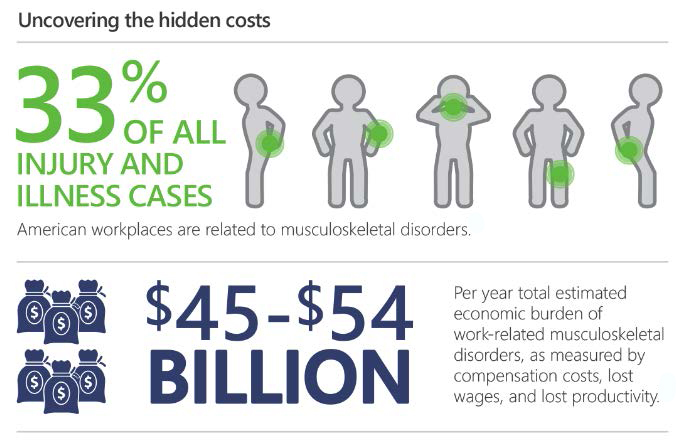
The number of repetitive strain injury reports from office environments has increased steadily since the early 1990s. This is mainly due to the increase in computer use and repetitive motions. For example, Microsoft conducted a study measuring the computer usage patterns of 88 participants over nine months and found that computer users strike the keyboard space bar an average of 669 times per hour of active computer use. That is undoubtedly repetitive.
Another survey of 335 professionals reported using computers an average of 5.8 hours daily, accounting for almost 70% of their total work day. Even though repetitive strain injuries do not appear suddenly through a slow process of multiple minor injuries building up, we can see a quickly rising trend of injuries being reported earlier. Sometimes, up to 50% of employees experience symptoms within the first year of employment.
Identifying and rectifying the underlying issues causing these employee injuries is vital to the businesses employing these people and the United States. Repetitive strain injuries result in workers’ compensation claims, costing nearly $15 to $20 billion in lost work time and medical claims annually.
A Brief History of Ergonomics

Ergonomics is the study of the human body and its functions. Ergonomists use this knowledge to build furniture, equipment, and devices that better suit the human body and its movements.
People have been suffering from musculoskeletal injuries (due to repetitive strain and injury) for centuries. Bernardo Ramazinni, a medical professional, complained of work-related injuries in a 1700s supplemental called “De Morbis Artificum” (Disease of Workers).
Even though we have been enduring this type of strain and injury for hundreds of years, the science behind ergonomics wasn’t developed until the 1950s, mainly in the factories where workers sustained debilitating injuries like arthritis from repetitive labor.
It wasn’t until the 1980s and the rise of computers in the office environment that designers realized that new furniture and office design were called for. Office workers began complaining of aches and pains caused by prolonged sitting, and companies had to recognize these injuries as workplace injuries and pay medical support for employees who suffered backaches, neck cramps, arthritis, and other ailments.
Today, most companies take ergonomics seriously, and those that don’t should reconsider. By investing in improving their office/workspace and their employees’ workstations today, companies can save hundreds of thousands of dollars in lost time, injuries, compensation, and insurance expenses.
What Can Be Done to Limit Worker Injury?
Limiting worker injury isn’t necessarily a sweeping fix. Workers must be seen as individuals with needs to help them be healthy and productive. A “one-size-fits-all” approach is not the way to solve ergonomic problems in the workplace. Let’s examine some of the most common issues caused by poor ergonomics and the solutions that can be implemented to solve them.
Problem: Carpal Tunnel Syndrome

Carpal Tunnel Syndrome is caused by pressure on the median nerve from the forearm to the hand. This pressure can be caused by swelling or anything that compresses the carpal tunnel, such as repetitive hand and wrist movement.
This pressure on the carpal tunnel and median nerve causes tingling, numbness, weakness, and pain in the hand, wrist, and forearm. Symptoms most often occur in the thumb, index finger, middle finger, and half of the ring finger. If you have problems with your other fingers but your little finger is delicate, this may be a sign of carpal tunnel syndrome. A different nerve gives a feeling to the little finger.
Early stages of Carpal Tunnel Syndrome cause numbness and pain that can be relieved by stretching, taking a break, or over-the-counter pain relief. More advanced cases of Carpal Tunnel Syndrome can lead to constant numbness and pain that may require medical attention, but the use of traditional ergonomics can still be beneficial. Unfortunately, ignoring this type of pain and injury can lead to permanent numbness, loss of hand coordination, and atrophied muscles in the hand, especially the thumb. Nerves damaged to this point may never be fully restored, even with surgery. Taking precautions early on and addressing existing pain is the key to preventing this damage.
The Solutions:
Preventing and minimizing carpal tunnel damage is fairly simple. Stretching your wrist and hand can keep pressure off the nerves and tendons. Using mouse and wrist pads or braces can keep your wrist in a more neutral position, reducing the repetitive stress on the wrist joints and carpal tunnel. Workers are also encouraged to take longer breaks between repetitive functions to reduce potential carpal tunnel swelling. This is one of the most straightforward and inexpensive problems to correct in a workspace.
Problem: Back and Lumbar Pain
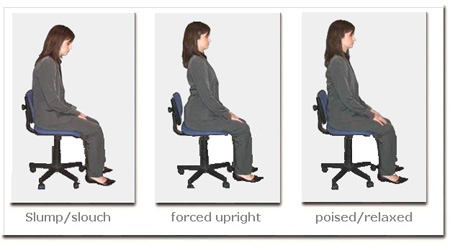
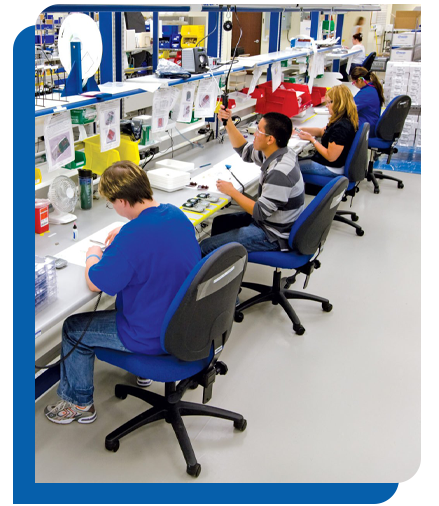
Many different things can cause back and lumbar pain, but with workplace injuries, sitting is one of the most significant factors in creating or exacerbating neck, shoulder, and back pain.
People rarely sit in a chair “correctly,” meaning with both feet shoulder-width apart, flat on the floor, with their backs entirely against the backrest. Most people tend to slouch over or slouch down, which can overstretch spinal ligaments, strain the discs in the spine, and damage other surrounding spinal structures. Over time, these injuries can develop or worsen back pain.
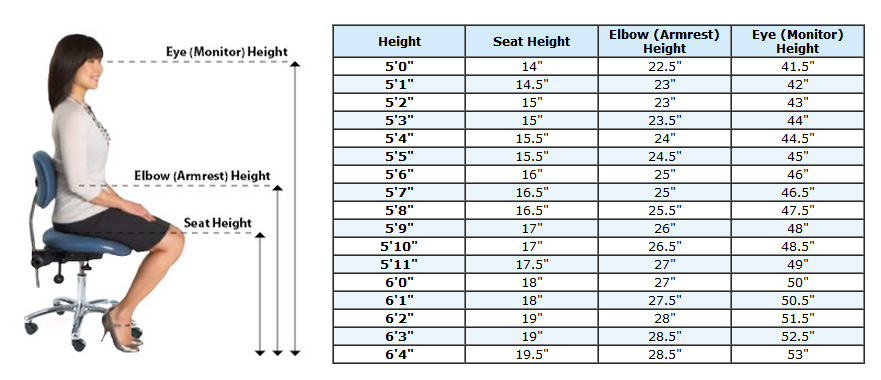
Another contributor to back pain is that people are not only sitting incorrectly but also using chairs that need to be corrected for their bodies. In this situation, “one-size-fits-all” is not the way to solve this issue in the workplace. Overall height, width, and seat pan sizes differ based on user heights and weights. The only way to ensure proper solutions is to view your workforce as individuals and address their unique builds.
The Solutions:
While this solution is fairly expensive, it can significantly increase productivity, output, missed time, insurance claims, and morale. Choosing easily reconfigurable chairs with easily replaced parts makes this type of investment an even smarter, more cost-effective solution. You can reconfigure parts of a chair for a new employee or one with changing needs without buying an entire new chair.
Buying a new chair is not enough; ensuring it’s being used properly is also essential. When purchasing new chairs, ask the rep handling your order if it is possible to demonstrate the product with the employees so everyone understands and can configure their chairs to fit their needs. An ergonomic chair can only do so much if the user is not correctly fitted to the seat.
The Problem: Leg and Knee Pain
While standing in a natural human posture poses no health hazards, people who work where they spend most of their time standing or walking report more pain in their feet, ankles, knees, legs, and even their lower back, shoulders, and neck.
These types of injuries seem temporary in the beginning, especially since sitting relieves most of the symptoms in the short term. Still, the long-term effects of prolonged standing can cause inflammation in the veins, leading to chronic and painful varicose veins. Other damaging effects from prolonged standing are immobilized or locked joints, temporary at first, eventually leading to rheumatic diseases and degenerative damage to tendons and ligaments.
The Solutions:
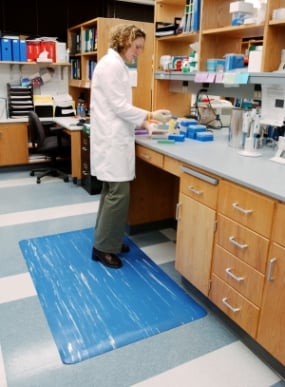
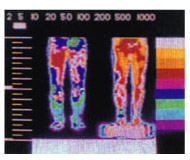
All standing employees should be encouraged to change positions frequently and be standing on an anti-fatigue mat. Anti-fatigue mats keep the body slightly off-balance, enough to keep the muscles moving and the blood pumping, preventing blood pooling and the numbness and pain that can come with that. Anti-fatigue mats can be placed at individual workstations in runners along walkways or stations. There are even solutions that employees can strap to their shoes, giving them the comfort and safety of an anti-fatigue mat without the installation or floor space needed for matting.
All equipment and furniture a standing employee uses should be height-adjusted to prevent excessive bending, reaching, or straining. This will also reduce the amount of injury an employee is exposed to.
Summary
This is not the definitive list of employee injuries, nor are these the only solutions available. By investing time and money now in ergonomics and health safety, companies can save in the long run by decreasing injuries, missed time, compensation, and insurance while increasing satisfaction, comfort, productivity, and revenue.
Production Automation offers various ergonomics and safety solutions, so browse the categories below. If you have questions about any of the products listed or general questions about improving ergonomics in your workplace, PAC is here to help. Shop Production Automation Ergonomic Solutions online or speak with an ergonomics expert today!
Shop Production Automation Ergonomic Solutions
Anti-Fatigue Matting (For all industries & environments)
Ergonomic Seating (Standard, big & tall, cleanroom, ESD)
Ergonomic Accessories (Footrests, monitor arms, standing stations)
Workstations (Modular, single, cleanroom, ESD)
www.gotopac.com (All products)